Tools

Building a studio takes more than microphones and monitors. You also need the right tools to mount, wire, test and finish the room. This section covers the hand tools, power tools and electrical tools used to set up a recording studio, podcast room, streaming space or control room. Typical jobs include mounting acoustic panels and shelving, running and terminating audio, video and network cables, testing connections, building cable looms, and checking power. Useful tools range from a drill, screwdriver set and spirit level to a multimeter, cable tester, wire strippers, crimpers, soldering iron and cable management supplies. Mains electrical work such as fitting sockets, new circuits or rewiring should always be done by a qualified electrician. The tools here are for low-voltage and cable work, assembly and testing.

Types of tools

Hand tool kits
Screwdrivers, pliers, hex keys and spanners for assembly and mounting
Drills and drivers
Cordless drills for mounting panels, racks and shelves
Measuring and levelling tools
Tape measures, spirit levels and laser levels for accurate placement
Electrical testers
Multimeters and socket testers for checking continuity and power
Cable testers
Check XLR, RJ45, BNC and other cables for faults
Cable preparation tools
Strippers, cutters and crimpers for building and terminating cables
Soldering equipment
Irons, solder, flux and stands for making and repairing cables
Cable management
Ties, Velcro straps, trunking and labels for neat cabling
Safety gear
Glasses, gloves and dust masks for installation work

Buying advice

  • Start with a basic kit: screwdrivers, pliers, a drill/driver, a tape measure, a level and a utility knife
  • Buy a multimeter that can measure continuity, voltage and resistance for testing cables and power
  • Get a cable tester that supports the connectors you use, such as XLR, RJ45 and BNC
  • Choose wire strippers that match the cable gauges you work with
  • Pick crimpers that fit your connectors, such as RJ45 or BNC, and check they ratchet for a consistent crimp
  • Buy a soldering iron with adjustable temperature if you build your own XLR or TRS cables
  • Use cable ties, Velcro straps and labels to keep cabling tidy and easy to trace
  • Use a stud finder and the right anchors before mounting panels, shelves or racks
  • Choose a cordless drill with a clutch so you don't over-tighten screws into walls and racks
  • Wear safety glasses, and use a plug-in socket tester before connecting expensive gear
  • Leave mains wiring and new circuits to a licensed electrician

Specifications to understand

Multimeter
A meter that measures voltage, current, resistance and continuity
Continuity test
A check that electricity can flow through a cable or connection without a break
Cable tester
A device that checks each wire in a cable is connected correctly
Wire gauge (AWG)
A number that shows the thickness of a wire, where a smaller number means a thicker wire
Wire stripper
A tool that removes cable insulation without cutting the conductor
Crimper
A tool that attaches connectors such as RJ45 or BNC to a cable
Soldering iron
A heated tool that joins connectors and wires with solder
Wattage (soldering iron)
The power of the iron, which affects how fast it heats and how well it holds temperature
Torque / clutch (drill)
A setting that stops the drill from over-tightening screws
Voltage (cordless tools)
The battery voltage, such as 12 V or 18 V, which affects power
Socket tester
A plug-in device that checks a mains socket is wired correctly
Stud finder
A tool that finds studs or hidden wires and pipes behind a wall
Heat shrink
Tubing that shrinks around a joint to insulate and protect it

Recommended tools

Best for: Instantly mapping full stud width, center, and edges through thick or multi-layer walls without calibration delays

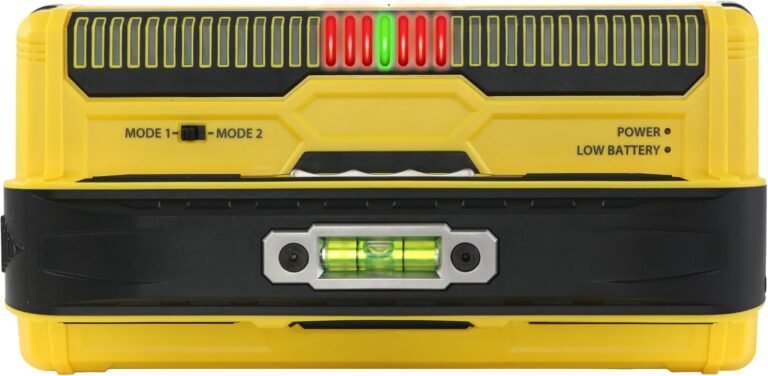
Franklin Sensors ProSensor MAX 13-Sensor Stud Finder, 2.5-in Deep Detection

A 13-sensor precision stud finder that instantly identifies the full width, center, and edges of wood and metal studs without requiring calibration. Featuring dual-scan depth modes up to 2.5 inches, an intuitive LED display array, a built-in bubble level, and a pencil caddy, it easily scans through multi-layer drywall, plaster, and OSB.

Type
Wall scanner · Stud finder (13-sensor array)
Connection
N/A (Standalone battery-powered handheld tool)
Detection method
13 high-precision electronic density sensors
Max detection depth
Up to 2.5 inches (63.5 mm)

Pros

  • 13 precision sensors display full stud width, center, and edges simultaneously
  • Zero calibration required—just press, hold, and slide across the wall

Cons

  • Larger housing footprint than basic single-sensor stud finders
  • Does not include dedicated AC live-wire voltage detection

Price: see current price on Amazon

Check Price on Amazon →

Comparison table

ProductBest forTypeConnectivityKey featureAmazon
Franklin Sensors ProSensor MAX 13-Sensor Stud Finder, 2.5-in Deep Detection Instantly mapping full stud width, center, and edges through thick or multi-layer walls without calibration delays Wall scanner · Stud finder (13-sensor array) N/A (Standalone battery-powered handheld tool) 13-sensor array with Dual-Mode scanning (up to 2.5" depth) and zero calibration needed See current price →

View equipment on Amazon →

Frequently asked questions

What tools do I need to build a home studio?

A drill/driver, screwdriver set, tape measure, level and utility knife cover most setup jobs. Add a multimeter, cable tester and wire strippers for cabling work.

Do I need a multimeter?

It's very useful for checking cables, connectors and power supplies, and for finding faults when something doesn't work.

Can I wire the studio's mains power myself?

Mains wiring should be done by a qualified electrician. The tools here are for low-voltage and cable work, not for installing sockets or circuits.

Do I need a soldering iron?

Only if you build or repair your own cables and connectors. Many people buy ready-made cables and never need one.

Which cable tester should I buy?

Choose one that supports the connectors you use most, such as XLR for audio and RJ45 for network.

How do I mount acoustic panels safely?

Use a stud finder to locate studs, choose anchors rated for the panel weight, and check the wall type first.

What's the best way to organize studio cables?

Use Velcro straps and cable ties to bundle runs, label both ends, and keep power cables apart from signal cables.