Converters

A video converter changes one type of video signal into another so that equipment with different connectors can work together. Common examples are SDI to HDMI, HDMI to SDI, and HDMI to USB for capture. Some converters also change the resolution or frame rate, or pass audio along with the video. Converters come up constantly in live production and streaming. A camera might output HDMI while your switcher takes SDI. A venue might need a long cable run, which SDI handles better than HDMI. A laptop might need to feed a projector or a capture device. The right converter depends on the signals you need to match, the resolution and frame rate you work at, and whether you need extras such as audio embedding or loop-through. This section covers converters for small streaming setups and for full broadcast facilities.

Types of converters

SDI to HDMI
Sends a professional SDI signal to HDMI monitors, TVs and projectors
HDMI to SDI
Brings HDMI cameras and laptops into SDI switchers and long cable runs
HDMI to USB
Captures HDMI video into a computer for streaming or recording
SDI to USB
Captures SDI video into a computer for streaming or recording
Bidirectional converter
Converts in both directions in a single unit
Scaler / format converter
Changes resolution or frame rate between devices
Fiber converter
Sends video over fiber-optic cable for very long distances

Buying advice

  • Identify the input and output connectors of your gear first (SDI, HDMI, USB, Ethernet)
  • Check the maximum resolution and frame rate the converter supports (such as 1080p60 or 4K30)
  • Make sure the converter handles every format you use, not just your main one
  • Look for audio support, including embedded audio and a separate audio input or output
  • Choose SDI for long cable runs and locking connectors, HDMI for short consumer runs
  • Check whether the unit needs external power or can run from USB or the signal itself
  • Look for loop-through outputs if you need to send the signal to two places
  • Consider a bidirectional or cross converter if you convert in both directions
  • Check that it can re-clock or reformat signals if you mix different frame rates
  • Keep a spare converter for live events, since a failure can stop the whole show

Specifications to understand

SDI
Serial Digital Interface, a professional video connection that carries video over BNC cable
HDMI
A consumer video connection found on cameras, laptops, monitors and TVs
SD-SDI / HD-SDI / 3G-SDI / 6G-SDI / 12G-SDI
SDI speed grades, covering standard definition, HD, 1080p60, 4K30 and 4K60
Resolution
The picture size the converter can handle, such as 1080p or 2160p (4K)
Frame rate
The number of frames per second, such as 24, 30 or 60
Embedded audio
Audio carried inside the video signal itself
Loop-through
Passes the input signal out to another device unchanged
Up / down / cross conversion
Changing the resolution or frame rate of a signal
Re-clocking
Rebuilding the timing of a signal so it stays stable over long cables
Bidirectional
A converter that works in both directions, such as SDI to HDMI and HDMI to SDI
Powered by USB / external power
How the converter gets power, which affects where you can use it

Recommended converters

Best for: Bringing analog gear into SDI workflows

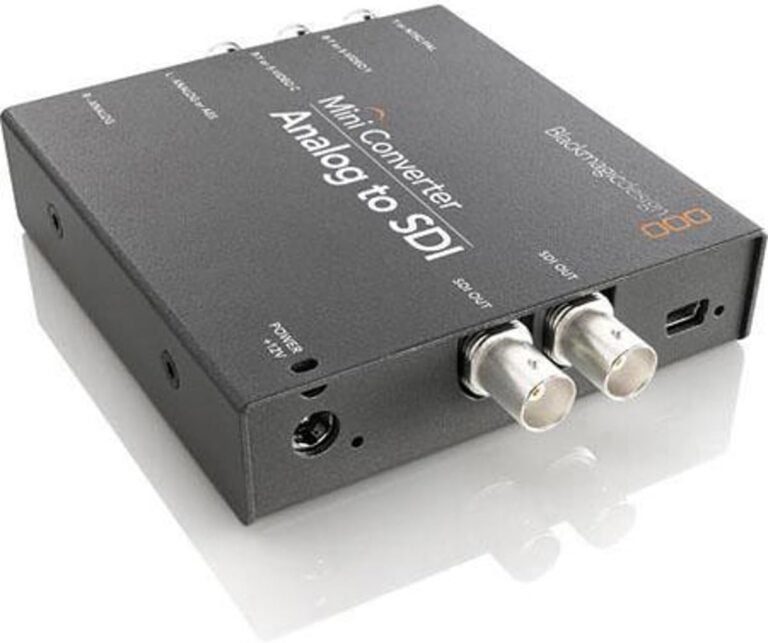
Blackmagic Design Mini Converter – Analog to SDI

Type
Mini converter · Analog to SDI
Connection
Analog video in, AES/EBU or analog audio in, SDI out
Conversion
Analog to SDI
Video inputs
Component (YUV), S-Video, composite (NTSC/PAL)

Pros

  • Brings analog sources into an SDI workflow
  • Accepts component, S-Video and composite video

Cons

  • Handles analog sources only, so it does not convert HDMI
  • Priced above basic converters, at about £214, A$341 or S$291 on Amazon listings

Price: see current price on Amazon

Check Price on Amazon →

Comparison table

ProductBest forTypeConnectivityKey featureAmazon
Blackmagic Design Mini Converter – Analog to SDI Bringing analog gear into SDI workflows Mini converter · Analog to SDI Analog video in, AES/EBU or analog audio in, SDI out Converts analog video to 3G-SDI and embeds audio, with automatic input format detection See current price →

View equipment on Amazon →

Frequently asked questions

What does a video converter do?

It changes one type of video signal into another so gear with different connectors can work together.

Do I need an SDI or an HDMI converter?

It depends on your devices. Use SDI to HDMI for sending SDI to a monitor, and HDMI to SDI for bringing an HDMI camera into an SDI system.

Why use SDI instead of HDMI?

SDI uses locking connectors and handles much longer cable runs, which is why professional setups favor it.

Does a converter carry audio too?

Many do, passing embedded audio with the video. Check the product specs to be sure.

Will a converter change my video quality?

A straight converter keeps the quality the same. A scaler changes resolution or frame rate, which can affect quality.

Can I convert 4K signals?

Yes, but only with a converter that supports your resolution and frame rate, such as 6G-SDI or 12G-SDI for 4K.

Do I need power for a converter?

Some run from USB or the signal, while others need an external power supply.